Empowering PEOPLE | Inspiring INNOVATION | Harmonising TECHNOLOGY

Power App for Smart Employee Leave Management

Simplifying Time Management for Small Businesses

LeaveCap is a Microsoft Power App built on the Dataverse platform to automate, simplify, and standardize leave management processes.
It empowers HR teams, managers, and employees to handle leave requests, approvals, cancellations, and payouts in real time—replacing spreadsheets and manual processes with a unified, auditable digital solution.

Through its integration with Microsoft Dynamics 365 Finance & Operations, LeaveCap automatically synchronizes leave balances, supports configurable policies (such as 18-month accruals or custom leave types), and provides a clear audit trail for every transaction.

The result is faster processing, improved policy compliance, and complete visibility of organizational leave liabilities.

Target Customers

TimeCap is purpose-built for small and growing organizations that need reliable time management without enterprise complexity.

Small and Medium-Sized Businesses — Seeking to modernize HR operations without adopting large enterprise systems.

Professional Services Firms — Accounting, legal, consulting, or creative agencies tracking employee leave against project delivery timelines.

Construction & Trade Businesses — Managing staff rotations, site coverage, and seasonal workforce absences.

Non-Profits and Community Organizations — Needing structured, auditable leave tracking for compliance and reporting.

Startups & Growth Companies — Requiring scalable, Microsoft-aligned solutions that evolve as the business grows.

Key Capabilities

Leave Request & Approval Workflow

End-to-end tracking of leave from submission to approval with full audit visibility.

Cancellation & Payout Management

Manage cancelled leave and facilitate leave payout requests with approval controls.

Custom Leave Policies

Configure leave types (annual, sick, bereavement, study, etc.), define limits, and set accrual rules.

Automated Accrual & Reset

18-month accumulation logic with automatic reset options to maintain compliance and accuracy.

Admin Dashboard

HR overview of employee balances, utilization, and pending approvals.

Analytics & Reporting

View real-time trends, liabilities, and usage metrics using Power BI or built-in dashboards.

Integration-Ready

Natively connects to Dynamics 365 F&O, Microsoft Teams, and Outlook for a seamless user experience.

Dataverse Security & Compliance

Role-based access, audit logs, and enterprise-grade data protection.

Key Features

Intuitive User Experience

Built on Power Apps for mobile and desktop use, ensuring accessibility for all staff.

Approval Hierarchies

Multi-level manager approvals configurable per department or business unit.

Leave Balance Visibility

Employees can view up-to-date balances and entitlement history.

Notifications & Alerts

Automated email and Teams notifications for pending approvals or balance thresholds.

Export & Reporting Tools

Generate Excel or Power BI reports for leave balances, financial liabilities, or trend analysis.

Audit Trail

Every action logged for transparency and compliance.

Flexible Setup

Define public holidays, carry-over limits, and accrual frequency to match your HR policy.

Dataverse Integration

Secure data storage with version control and analytics integration.

Key Benefits

Efficiency – Automates leave requests and approvals, reducing HR administrative effort.

Transparency – Provides employees and managers with full visibility of leave balances and history.

Customization – Adapts easily to any organizational leave policy or structure.

Compliance – Enforces internal policies and labour regulations through automated validation and audit logs.

Integration – Works seamlessly with Microsoft Dynamics 365 and Power Platform for a unified data model.

Employee Experience – Improves morale through self-service and clear communication of entitlements.

Data-Driven Insights – Enables HR to monitor usage patterns, manage liabilities, and forecast workforce availability.

Scalable – Grows with your business, supporting multiple locations, entities, and policies.

Experience TimeCap in action. 

Ready to simplify your leave management process? 
Get in touch with the TeamGenix team to book a live demo of LeaveCap and see how it integrates effortlessly with your Microsoft ecosystem. 

At a glance:

Detailed Breakdown of Product Features and Guide:

LeaveCap User Guide

Introduction

Welcome to LeaveCap! 

This comprehensive guide is designed to help you navigate and make the most of our app’s powerful features. Whether you’re capturing timesheet entries one at a time or in bulk, approving timesheet entries, exporting entries, setting up SLA Warnings or automating exports, this guide will provide you with step-by-step instructions and tips to streamline your timekeeping processes.  

a. Dashboard 
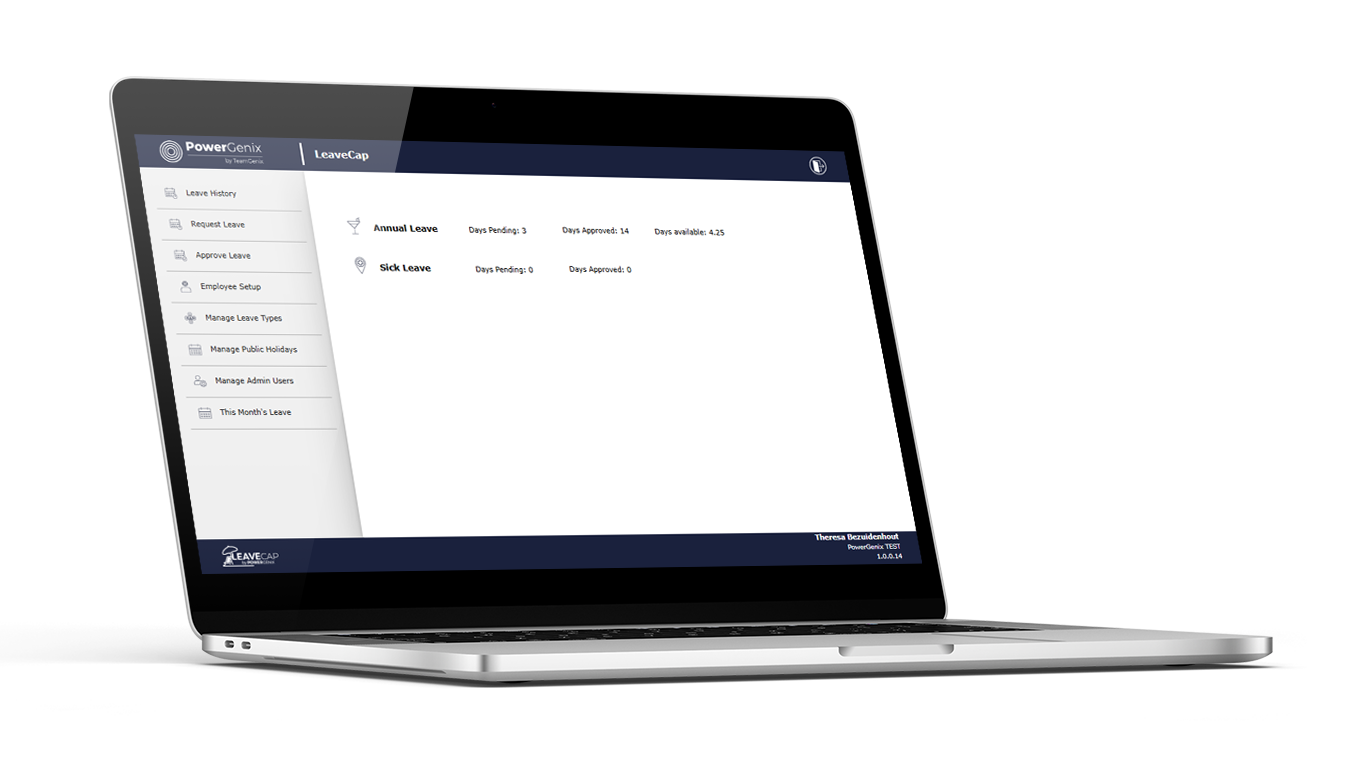
Display logged on user’s different types of leave with number of days pending, number of days approved, and number of days available (if leave type is set up to show balance) 

b. Navigation Menu 
The navigation menu allows you to access different sections of the app. See numbers 3 to 10 of this document. 

dashboard overview

From the Home screen,click on the Leave History button in the navigation section. 

Lists leave history for the logged-on user. 

a. Leave Types 
Select leave type to see requests for the selected leave type.  

b. Leave Status 
Select status to see requests for the selected leave type and selected status 

c. Cancel Leave 
Cancel future leave requests already approved. 

d. Leave Requests 
Requests as per selected types and status 

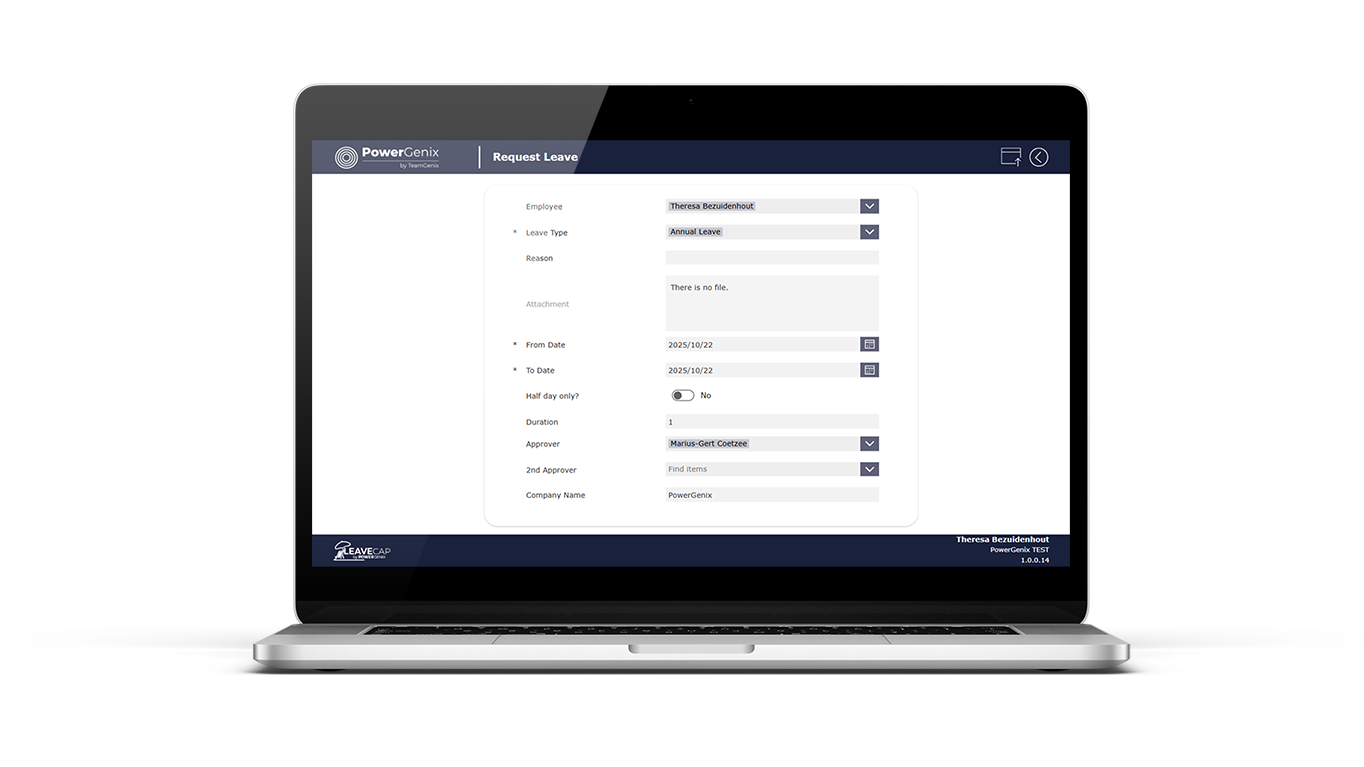
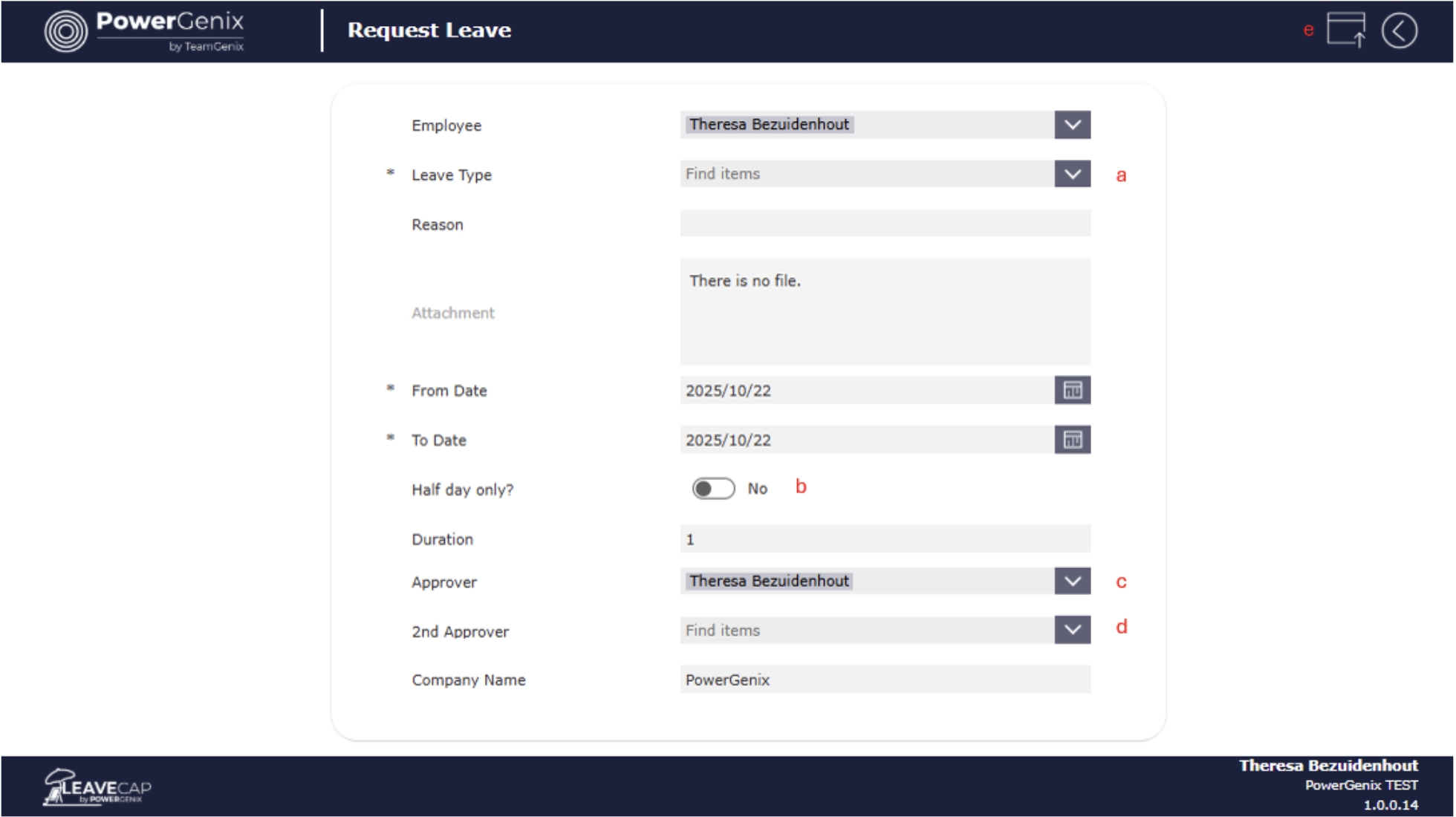
From the Home screen, click on the Request Leave button in the navigation section. 

a. Leave Type 
Click and select leave type 

b. Half day only 
Select Yes if the request is for half-day only 

c. Approver 
Manager, as set up in MS Entra, is selected by default, but another person in the organization can be selected. 

d. 2nd Approver 
Select as a ‘back up’ for Approver, either one will be able to approve, only one approval necessary 

e. Submit 
Click to submit new request 

From the Home screen, click on the Approve Leave button in the navigation section.   List requests where the logged-on user is an approver or 2nd approver. 

a. Leave Type 
Click to select the required leave type 

b. Filter by Employee 
Filter requests by Employee 

c. Filter by Status 
Filter requests by Status 

d. Set Status 
Select the relevant status to update the request 

e. Set Approval Comments 
Set a comment for the reason for the status selected 

f. Select request 
Select relevant requests to update status 

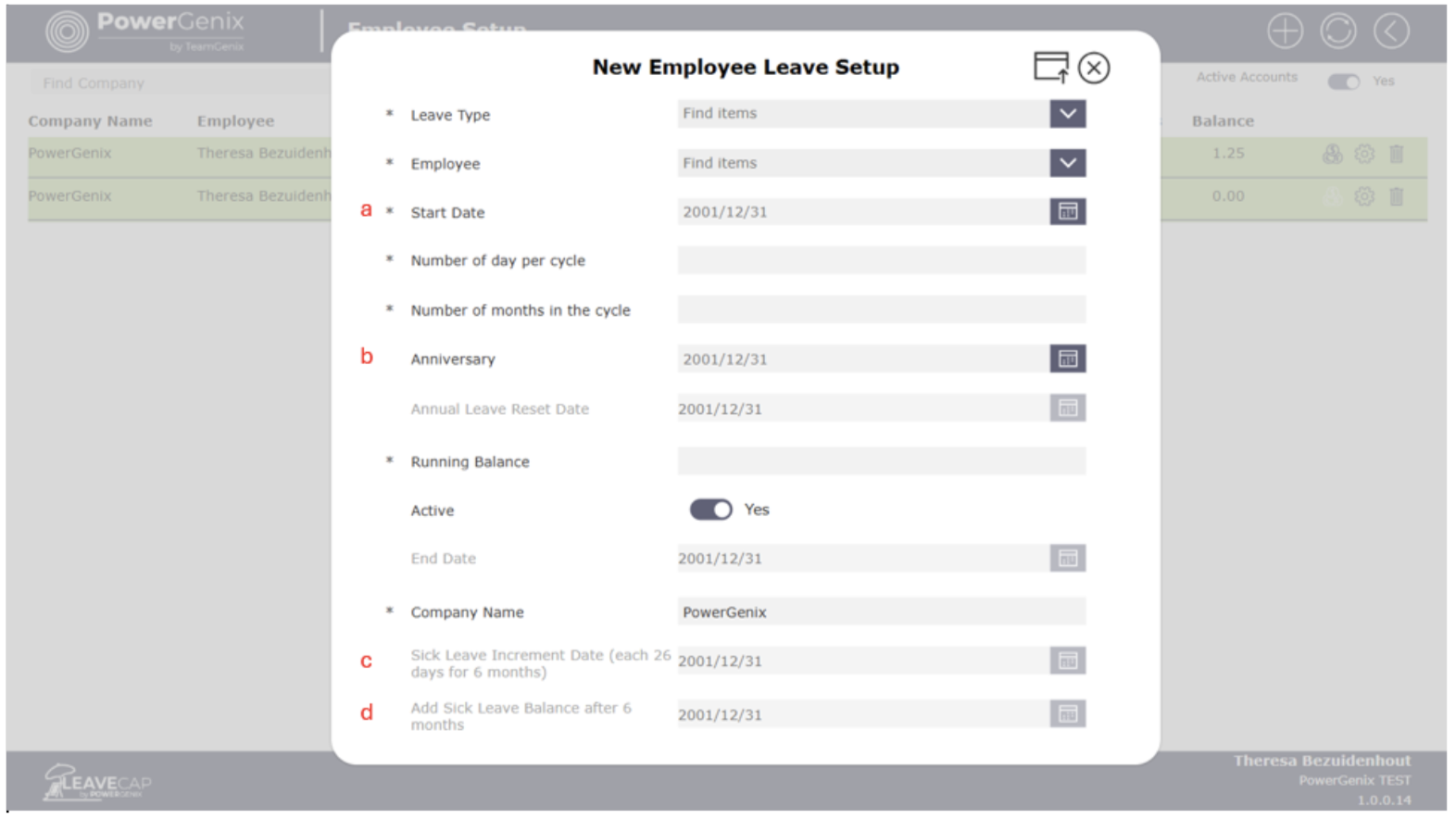
From the Home screen, click on Employee Setup in the navigation section.  

The button is only enabled for Admin users 

a. Start Date 
Date the employee starts at the company 

b. Anniversary 
The date the specified leave type will star a new cycle. Date will automatically populate based on the leave type setup. See section 7 of this document. 

c. Sick leave incremental Date 
The first 6 months after an employee starts, they are allocated 1 sick leave day for every 26 days. This date is the first date that the day will be allocated. 

d. Sick leave Add Balance Date 
After 7 increments of 26 days, the balance of the sick leave days are allocated. 

From the Home screen, click on Manage Leave Types in the navigation section. 

The button is only enabled for Admin users 

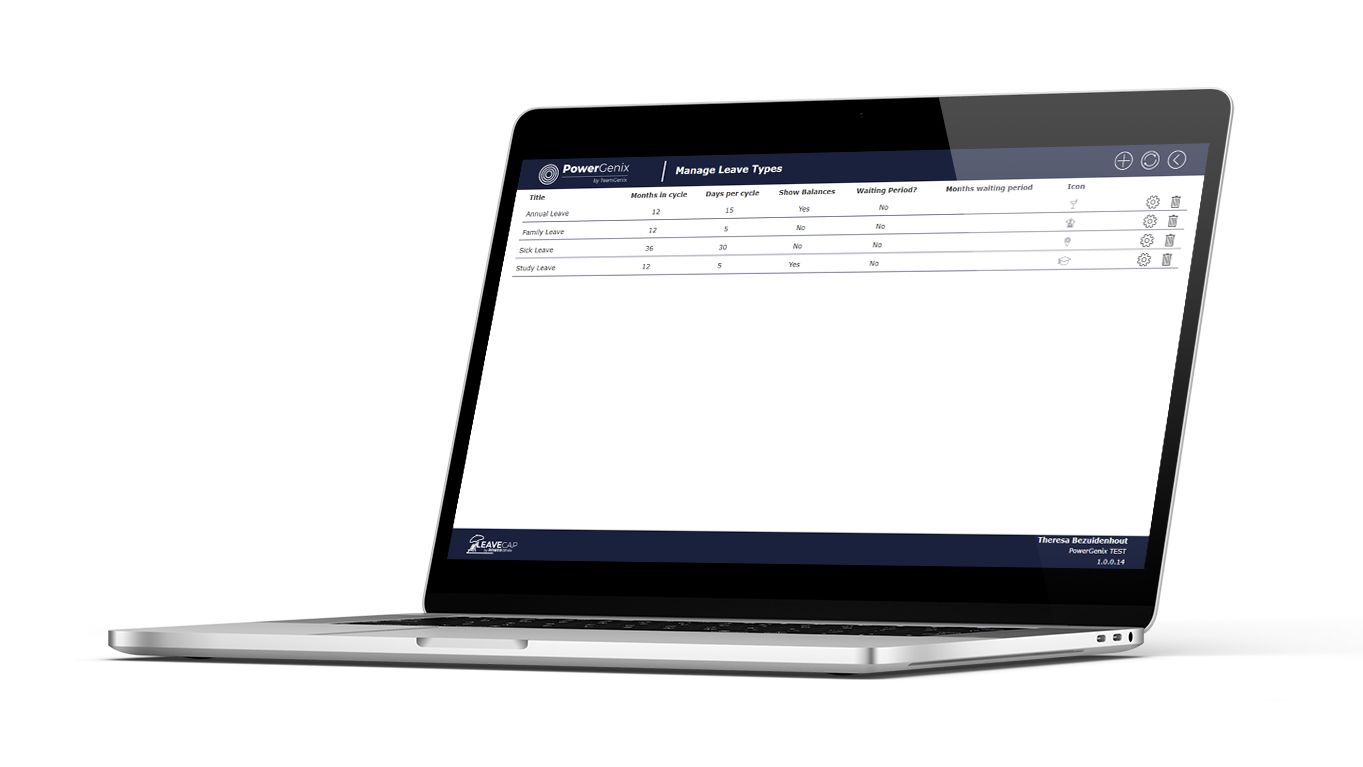
Add each leave type, including the number of months in a cycle for the leave type, and the number of days of leave per cycle.

If a waiting period is required before the type of leave is allocated, indicate and specify the number of months for the waiting period.

Add an image per leave type, images preferred size should be 301 x 301 

a. Add new leave type 
Add a new leave type with all required information. 

b. Months in Cycle 
The number of months in the cycle i.e. 1 year = 12 months 

c. Days per Cycle 
Number of leave days in the cycle  

d. Show balances 
If selected Yes, the available days for the leave type will be displayed on the home screen 

e. Waiting period 
Indicate if there should be a waiting period before this type of leave is allocated 

f. Months in the waiting period 
If a waiting period is required, indicate the number of months for the waiting period 

g. Icon 
Add an image per leave type, images preferred size should be 301 x 301 

h. Settings / Edit 
Click to make changes to leave type 

i. Delete 
Click to delete leave type 

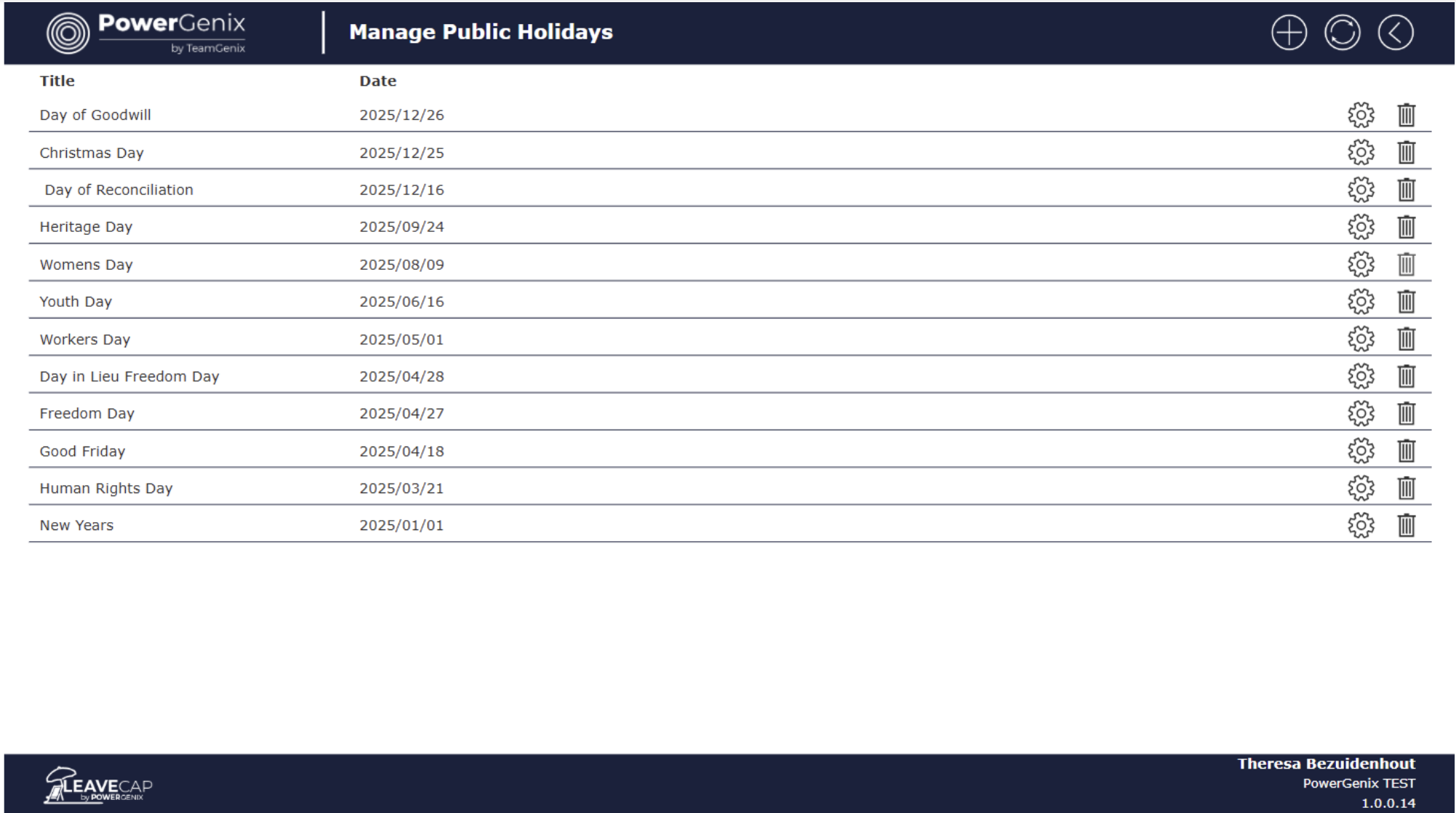
From the Home screen click on the Manage Public Holidays button in the navigation section. 

Add new year’s public holidays and remove public holidays from past years. 

The button is only enabled for Admin users 

From the Home screen, click on the Manage Admin Users button in the navigation section. 

Add, remove or edit users that has admin privileges. 

The button is only enabled for Admin users 

From the Home screen, click on Manage User Access in the navigation menu to manage user access.

Users need to be set up as an Employee or Manager.

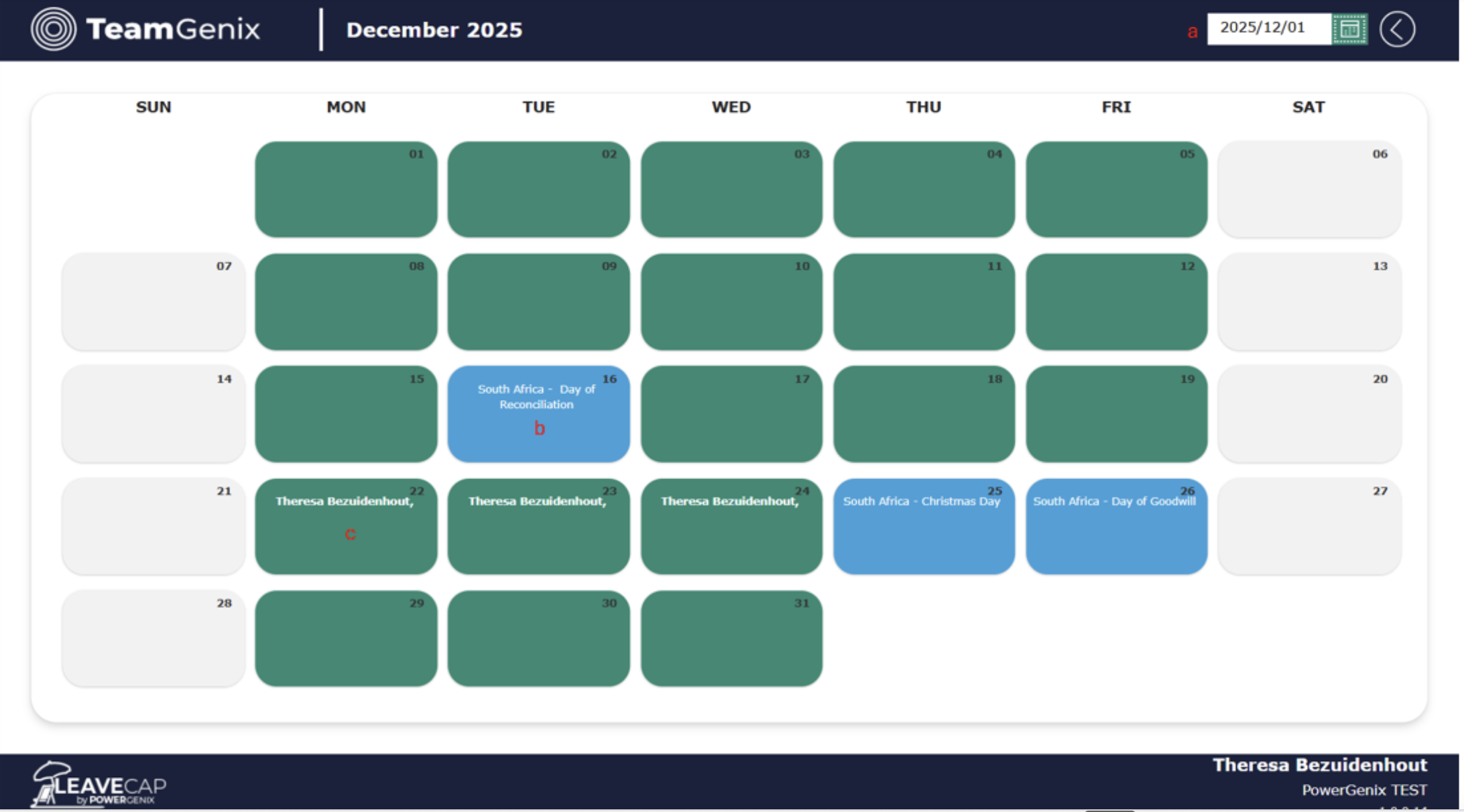
a. Select Month 
Select a date/month to view employees with approved leave for the selected month. 

b. Public Holiday 
Public holidays are filled with blue, and the name of the public holiday is displayed 

c. Employee on Leave 
Name of Employees with approved leave on specific day is displayed 

Power Platform Environment

Step 1: Install the solution

Create a Power Platform environment (with Dataverse) to host the solution if one does not already exist. Refer to the Create and manage environments in the Power Platform admin centre page for guidance.

Set up a new service user account in Microsoft Entra and grant this account system administrator privileges within the Power Platform environment.

Use the service account to install the “TimeCap” solution from the Microsoft Marketplace.

Step 2: Configure the solution   

Go to the “TimeCap” installed solution in managed solutions and open it.

Expand the table node and click on the table “TimeCapConfig”.

Add the column AppLink, EnvironmentName, TechEmail to the table view.

Enter the Environment Name in the EnvironmentName field in the table.

Enter the email address of the person that should be notified if a flow fails in the TechEmail field in the table

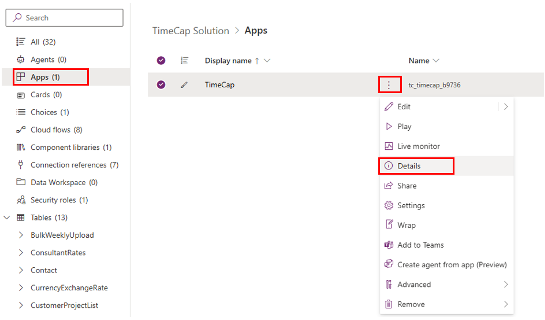
Select Apps and then choose TimeCap

Click on the vertical ellipse button and click on the “Details” menu item, see the image below

Expand the table node and click on the table “TimesheetClosureCompany”.

Add the column CompanyName and ClosedDate to the table view.

Enter the Company Name in the CompanyName field in the table.

Enter the Closed Date, this date acts as a cutoff for time entry submissions. No entries can be created before or on this date.

Step 3: Setup users 

In Microsoft 365 admin center create a security group

Add all users that need access to the app in the group as members

In the Power Platform admin center, navigate to the environment where the solution is and click on See all under Security roles.

Search for TimeCap Users Security Role, click on the ellipse and click on Members and add the security created in the previous step.

Navigate to the installed TimeCap solution within managed solutions and open it.

Select Apps and then choose TimeCap

Click on the vertical ellipse button and click on the “Share” menu item, see the image below

Enter the name of the security group created earlier.

Please note the following:   

The user will need a Power App Premium license to access the app.

The account that will be the owner of the workflow will need to have a blank Excel workbook in the OneDrive root folder called ExcelTemplate.xlsx

 Contact Us 

If you have any questions or suggestions about the Terms and Conditions, please do not hesitate to contact the Service Provider at info@powergenix.net

Privacy Policy:

  1. Introduction

TeamGenix Group Limited (“we”, “our”, “us”) is committed to protecting your privacy. This Privacy Policy explains how we collect, use, disclose, and safeguard your information when you use our TimeCap App (the “App”), available on the Microsoft Marketplace. Please read this privacy policy carefully. If you do not agree with the terms of this privacy policy, please do not access the App.

  1. Information We Collect

We may collect and process the following types of information:

  • Personal Data: Identifiable information such as your name, email address, phone number, and any other information you provide when using the App.
  • Usage Data: Information about how you use the App, such as access times, pages viewed, your IP address, and information about the device you use to access the App.
  • Customer Data: Data imported into the App by users, which may include personal or business information
  1. How We Use Your Information

We use the information we collect in the following ways:

  • To Provide and Maintain the App: To ensure the App functions as intended and to provide necessary support.
  • To Improve the App: To understand how users interact with the App and to make improvements.
  • To Communicate with You: To send administrative information, updates, security alerts, and support messages.
  • For Legal Compliance: To comply with legal obligations, resolve disputes, and enforce our agreements.
  1. Sharing Your Information

We do not sell, trade, or otherwise transfer your personal data to outside parties except as described below:

  • Service Providers: We may share your information with third-party service providers who perform services on our behalf, such as hosting, data analysis, and customer service.
  • Legal Requirements: We may disclose your information if required to do so by law or in response to valid requests by public authorities.
  • Business Transfers: If we are involved in a merger, acquisition, or asset sale, your information may be transferred as part of that transaction.
  1. Data Security

We implement reasonable administrative, technical, and physical security measures to protect your information from unauthorized access, use, alteration, and disclosure. However, no method of transmission over the Internet or method of electronic storage is completely secure.

  1. Data Retention

We will retain your personal data only for as long as necessary to fulfill the purposes outlined in this Privacy Policy unless a longer retention period is required or permitted by law.

  1. Your Data Protection Rights

Depending on your location, you may have the following rights regarding your personal data:

  • Access: Request access to your personal data.
  • Correction: Request correction of inaccurate or incomplete personal data.
  • Deletion: Request deletion of your personal data.
  • Objection: Object to our processing of your personal data.
  • Restriction: Request restriction of processing your personal data.
  • Portability: Request transfer of your personal data to another service provider.

To exercise these rights, please contact us at info@teamgenix.global.

  1. Changes to This Privacy Policy

We may update this Privacy Policy from time to time. We will notify you of any changes by posting the new Privacy Policy on this page. You are advised to review this Privacy Policy periodically for any changes.

  1. Contact Us

If you have any questions about this Privacy Policy, please contact us at: info@teamgenix.global.

Terms & Conditions:

These terms and conditions applies to the FinPlicity App (hereby referred to as “Application”) that was created by TeamGenix Group Limited (hereby referred to as “Service Provider”) as a Commercial service.

Upon downloading or utilizing the Application, you are automatically agreeing to the following terms. It is strongly advised that you thoroughly read and understand these terms prior to using the Application. Unauthorized copying, modification of the Application, any part of the Application, or our trademarks is strictly prohibited.

Any attempts to extract the source code of the Application, translate the Application into other languages, or create derivative versions are not permitted.

All trademarks, copyrights, database rights, and other intellectual property rights related to the Application remain the property of the Service Provider.

The Service Provider is dedicated to ensuring that the Application is as beneficial and efficient as possible. As such, they reserve the right to modify the Application or charge for their services at any time and for any reason.

The Service Provider assures you that any charges for the Application or its services will be clearly communicated to you. The Application stores and processes personal data that you have provided to the Service Provider in order to provide the Service. It is your responsibility to maintain the security of your device and access to the Application.

The Service Provider strongly advise against jailbreaking or rooting your device, which involves removing software restrictions and limitations imposed by the official operating system of your device. Such actions could expose your device to malware, viruses, malicious programs, compromise your device’s security features, and may result in the Application not functioning correctly or at all.

Please note that the Application utilizes third-party services that have their own Terms and Conditions. Below are the links to the Terms and Conditions of the third-party service providers used by the Application:

• Microsoft

Please be aware that the Service Provider does not assume responsibility for certain aspects. Some functions of the Application require an active internet connection, which can be Wi-Fi or provided by your mobile network provider.

The Service Provider cannot be held responsible if the Application does not function at full capacity due to lack of access to Wi-Fi or if you have exhausted your data allowance.

If you are using the application outside of a Wi-Fi area, please be aware that your mobile network provider’s agreement terms still apply. Consequently, you may incur charges from your mobile provider for data usage during the connection to the application, or other third-party charges.

By using the application, you accept responsibility for any such charges, including roaming data charges if you use the application outside of your home territory (i.e., region or country) without disabling data roaming.

If you are not the bill payer for the device on which you are using the application, they assume that you have obtained permission from the bill payer. Similarly, the Service Provider cannot always assume responsibility for your usage of the application. For instance, it is your responsibility to ensure that your device remains charged.

If your device runs out of battery and you are unable to access the Service, the Service Provider cannot be held responsible. In terms of the Service Provider’s responsibility for your use of the application, it is important to note that while they strive to ensure that it is updated and accurate at all times, they do rely on third parties to provide information to them so that they can make it available to you.

The Service Provider accepts no liability for any loss, direct or indirect, that you experience as a result of relying entirely on this functionality of the application.

The Service Provider may wish to update the application at some point. The application is currently available as per the requirements for the operating system (and for any additional systems they decide to extend the availability of the application to) may change, and you will need to download the updates if you want to continue using the application.

The Service Provider does not guarantee that it will always update the application so that it is relevant to you and/or compatible with the particular operating system version installed on your device.

However, you agree to always accept updates to the application when offered to you. The Service Provider may also wish to cease providing the application and may terminate its use at any time without providing termination notice to you.

Unless they inform you otherwise, upon any termination, (a) the rights and licenses granted to you in these terms will end; (b) you must cease using the application, and (if necessary) delete it from your device.

Changes to These Terms and Conditions The Service Provider may periodically update their Terms and Conditions.

Therefore, you are advised to review this page regularly for any changes. The Service Provider will notify you of any changes by posting the new Terms and Conditions on this page.

These terms and conditions are effective as of December 2024. Contact Us If you have any questions or suggestions about the Terms and Conditions, please do not hesitate to contact the Service Provider at info@teamgenix.global.

Support:

Please log a ticket for App support or queries

Contact Us